If you cannot find your pay stubs, please contact us:
Phone: 888.570.4650 (in the U.S.)
Phone: 818.659.6455 (outside the U.S.)
Email: employeehelpdesk@castandcrew.com
Business hours: Monday – Friday / 7:00 a.m. – 7:00 p.m. PT
Weekend hours: 7:00 a.m. – 4:00 p.m. PT
This article shows you how to perform this task in both Classic and New experiences.
Steps for Classic Experience
Copies of your pay stubs are available on your MyCast&Crew portal at my.castandcrew.com.
After you log in, click the Pay Stubs tab. Click the 3-dot menu icon located in the top-right corner of the card to view or download a copy.
Watch how to do this in the video below:
Steps for New Experience
Copies of your pay stubs are available on your MyCast&Crew portal at my.castandcrew.com.
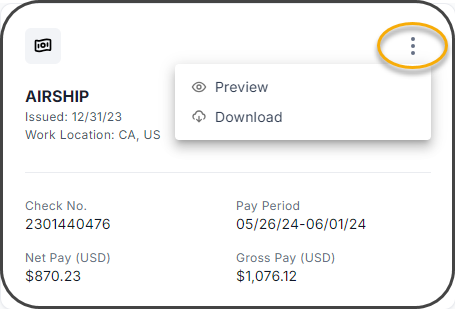
After you log in, click the Pay Stubs tab. Click the 3-dot menu icon located in the top-right corner of the card to preview or download a copy:
If desired, you can also check the box in the top-left corner of a pay stub to multi-select pay stubs and perform bulk actions. Checking at least one box will show the bulk action bar at the bottom of the screen:
With the pay stubs checked/selected, you can bulk download or email them.
Watch how to do this in the video below: